Consumer Invoicing (Finland)
Maventa supports several channels for delivering invoices to consumers in Finland: e-invoices and direct payments to the consumer’s netbank, Posti’s OmaPosti digital mailbox, email, and print. OmaPosti replaced Kivra on 15th of October 2026, and consumers have to activate OmaPosti themselves to keep receiving digital post. Until 1st of March 2027, the print service can also forward invoices to the consumer’s OmaPosti digital mailbox.
The delivery channels are attempted in the following priority order: e-invoice and direct payments, digital mailbox (OmaPosti, with Kivra as a fallback until 31st of October 2026), email, print (OmaPosti, until 1st of March 2027), and print (letter).
Kivra has been bought by Posti, and the OmaPosti service has replaced it. Kivra’s digital post service in Finland has transferred to Posti as part of a corporate arrangement. Kivra’s service ends for consumers on 1st of December 2026, and Posti’s OmaPosti takes its place.
Consumers are not moved across automatically. Posti does not activate OmaPosti on a consumer’s behalf. Kivra still accepts deliveries until 31st of October 2026 for consumers who have a Kivra account but no OmaPosti, but from November 2026 onwards a consumer who has not activated OmaPosti has no digital mailbox, and their invoices take the next available route, such as email or print.
Maventa moved its digital post traffic from Kivra to OmaPosti on 15th of October 2026. At the same time, the sending parameter print_settings[allow_kivra_fi] was renamed to print_settings[allow_digital_post]. The old name keeps working, so no code changes are required. See Kivra moves to OmaPosti for the full description of the change.
Consumer invoicing to Finnish consumers is only available to Finnish senders. To use this service, your company must be a Finnish company with a valid Finnish business ID (Y-tunnus) registered in Maventa. Companies registered in other countries cannot send invoices to Finnish consumers through this channel — use email or print instead.
E-invoicing and direct payments to consumer’s netbank
Consumer e-invoicing (B2C) in Finland delivers e-invoices directly to consumers’ online banks. For consumers who do not use online banking, direct payments can be arranged instead. This service is available only for Finnish companies registered with Maventa. To invoice consumers outside Finland, use email or print.
B2C e-invoicing requires activation through bank messaging. The supplier sends a Sender Info (SI) message to inform banks and consumers that the supplier is ready to send consumer e-invoices. Consumers then confirm their choice with a Receiver Info (RI) message. The supplier can also use a Receiver Proposal (RP) message to request the consumer’s e-invoice address.
Consumer e-invoicing process flow
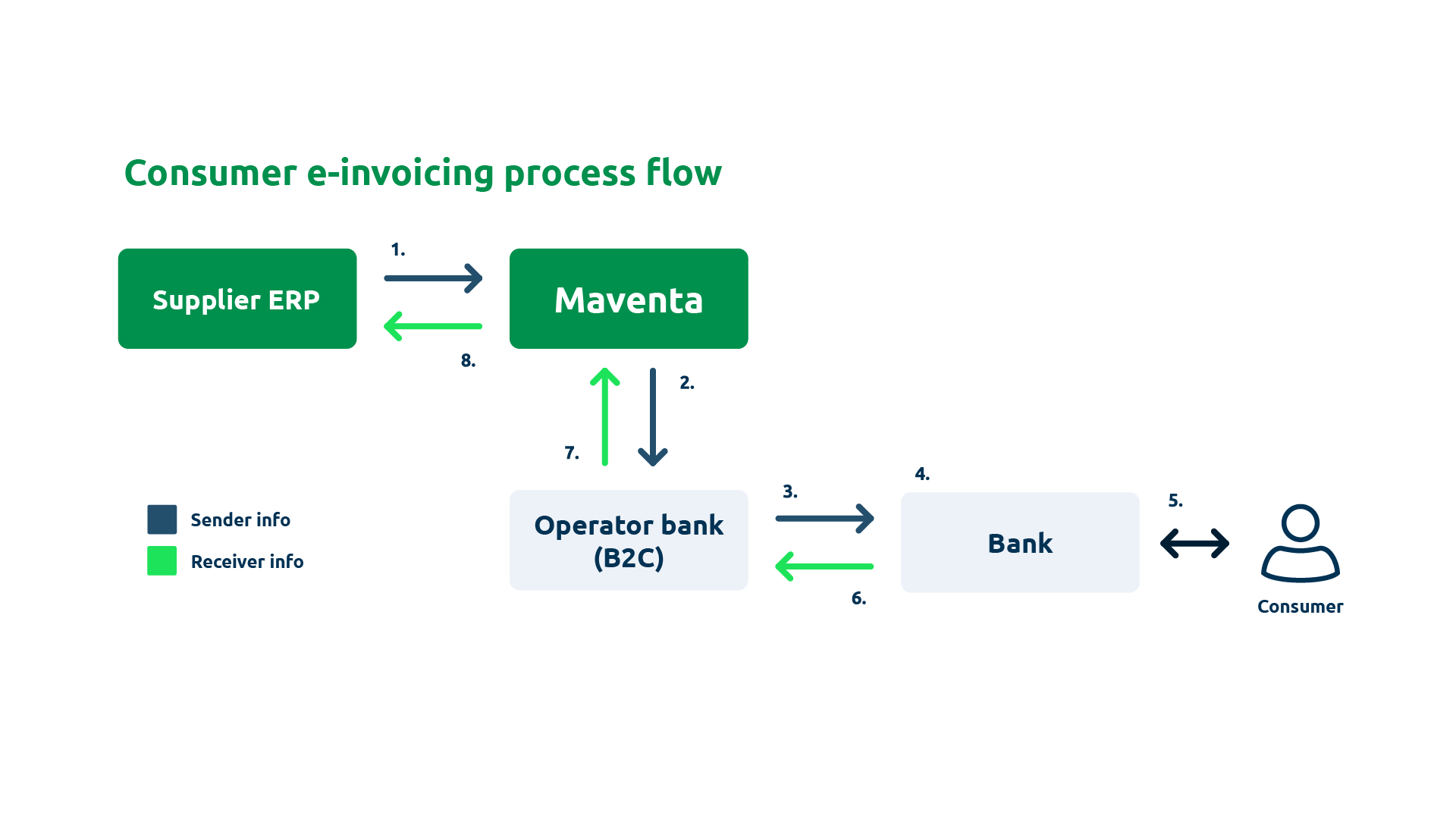
- The supplier’s ERP creates and sends SI-messages to Maventa via API, or the supplier sends them through the Maventa UI. A separate message is required for each bank.
- Maventa forwards the SI-messages to the operator bank.
- The operator bank distributes the SI-messages to the relevant banks.
- Each bank records that the supplier is ready to send consumer e-invoices via Maventa. The supplier becomes searchable in the e-invoice registry available in consumers’ netbanks.
- The consumer searches for the supplier by name or business ID in their netbank and selects the option to receive e-invoices. The consumer provides the identification reference requested in the SI-message (for example, a customer or reference number).
- The bank sends an RI-message (ReceiverInfo) to the operator bank, confirming that the consumer wants to receive e-invoices.
- The operator bank forwards the RI-message to Maventa.
- The supplier’s ERP downloads the RI-message from Maventa and stores the consumer’s information in its consumer registry.
- The supplier can now send e-invoices to that consumer through the netbank.
Opening the consumer e-invoicing service
Before sending consumer e-invoices, the supplier must have an active bank network connection, have sent SI-messages, and have received RI-messages for the target consumers.
In short:
- Activate the bank network connection. Verify the activation using the REST API by calling GET /v1/company/profiles and checking that the BANK network status is active. The activation request is sent automatically when the company authorisation request is submitted. Processing usually takes a few days, depending on Danske Bank’s workload. SI-messages can only be sent once the connection is active.
- Send SI-messages to each bank the supplier wants to use.
- Receive RI-messages confirming that consumers have selected the supplier as their e-invoice sender.
- Start sending consumer e-invoices from the ERP.
SI-messages
The SI-message (SenderInfo) notifies the banking network that the supplier is ready to send consumer e-invoices and direct payments. It serves as an agreement between the supplier and the bank.
To create a new agreement, send an SI-message with MessageActionCode = ADD through the Maventa API to each bank. After sending, poll the status of the message.
Maventa shows the status as OK once the message has been sent to the operator bank. Communication between banks may take 1–4 banking days, so error messages can appear even after several days. Once everything is in order, RI-messages from consumers start arriving.
If a message fails on the bank side, an error response is returned. To check SI-message errors, first list the error IDs and then retrieve the detailed error message.
To update an existing agreement, send an SI-message with the type CHANGE. This allows modification of almost all fields except the billing subject code (PaymentInstructionIdentifier). When updating account information, e-invoice addresses, or intermediaries, include both old and new elements. Other details are overwritten by the new values.
To change the billing subject code, first terminate the old SI-message with a DELETE message, then create a new one with ADD.
To delete a supplier agreement entirely, send an SI-message with the type DELETE. This also removes all consumer agreements (RI-messages) linked to that agreement.
Implementation guidelines (Notification Service Guidelines 2.01) and a tool for creating SI-messages (Invoicer Message Program) are available on Finance Finland’s webpage.
All B2C traffic in Finland is routed through Maventa’s intermediary bank, Danske Bank. The SI-message must always include DABAFIHH as the sender operator code.
SI-messages (and RP-messages) can also be sent through the Maventa UI (B2C messages → Sent messages). Messages can be uploaded as separate files (one per message) or as a combined file containing multiple messages. The combined format is generated by the Invoicer Message tool from Finance Finland’s website.
- Send messages (SI, RP): POST /v1/fi_bank_messages
- Poll the status of a sent message: GET /v1/fi_bank_messages/{id}
- List error message IDs: GET /v1/fi_bank_messages/error_messages
- Download a specific error message: GET /v1/fi_bank_messages/error_messages/{id}
Billing subject code (PaymentInstructionIdentifier)
Consumer invoices must include a billing subject code (PaymentInstructionIdentifier), defined by the sender in the SI-message. This code specifies the reason for payment and links the invoice to the correct consumer e-invoicing agreement.
A single supplier can have multiple SI-messages with different billing subject codes. When sending consumer e-invoices, the billing subject code in the invoice must match the one defined in the corresponding SI-message.
- In Finvoice, the billing subject code is provided in the
EpiPaymentInstructionIDfield. - In TEAPPSXML, the corresponding element is
HEADER / PAYMENT_INSTRUCTION_IDENTIFIER.
To display the reason for payment in the consumer’s netbank, also specify it in the SellerInvoiceTypeText element:
<SellerInvoiceDetails>
   <PaymentInstructionIdentifier>Vuokra</PaymentInstructionIdentifier>
   <SellerInstructionFreeText LanguageCode="FI">Anna viimeisimmän laskun viitenumero </SellerInstructionFreeText>
   <SellerInstructionFreeText LanguageCode="SV">Ge den senaste fakturans referensnummer </SellerInstructionFreeText>
   <SellerInstructionFreeText LanguageCode="EN">Enter the reference number </SellerInstructionFreeText>
   <SellerInvoiceTypeDetails>
     <SellerInvoiceTypeText LanguageCode="FI">Vuokra lasku</SellerInvoiceTypeText>
     <SellerInvoiceIdentifierText LanguageCode="FI" SellerInvoiceIdentifierType="01">Viitenumero</SellerInvoiceIdentifierText>
   </SellerInvoiceTypeDetails>
   <SellerServiceCode>01</SellerServiceCode>
</SellerInvoiceDetails>
Bank account information
The supplier’s bank account information is specified in the SellerAccountDetails element of the SI-message. All account numbers must be in IBAN format, and the supplier must list every account intended for use in consumer e-invoicing. The IBAN in the invoice must match one of the IBANs defined in the corresponding SI-message.
E-invoicing banks
Finnish banks that support consumer e-invoicing. Maventa recommends sending an SI-message to each of these banks. The consumer invoice channel supports sending both the invoice image and attachments. Depending on the bank, the consumer may also have access to an invoice display service where they can download the original image and attached files.
| Bank Identifier Code | Bank name | Image and attachments |
|---|---|---|
| AABAFI22 | Ålandsbanken | Not supported |
| DABAFIHH | Danske Bank | Supported |
| HELSFIHH | Aktia | Supported |
| ITELFIHH | Säästöpankit, Oma Säästöpankki | Supported |
| NDEAFIHH | Nordea Pankki | Supported |
| OKOYFIHH | OP-Pohjola-ryhmä | Supported |
| POPFFI22 | POP Pankit | Supported |
| SBANFIHH | S-Pankki | Supported |
RI-messages
RI-messages (ReceiverInfo) represent consumer e-invoicing agreements between the consumer and the supplier. Each RI-message is linked to an existing SI-message — one per consumer who has chosen to receive e-invoices from the supplier through their bank.
-
MessageActionCode=ADD: A new consumer has selected the supplier as their e-invoice sender. -
MessageActionCode=CHANGE: A consumer’s details have been updated. -
MessageActionCode=DELETE: A consumer has terminated the agreement.
Maventa recommends maintaining an up-to-date consumer registry in the ERP, reflecting the current status of all RI-messages. List and download new RI-messages daily to keep the registry synchronised. If an e-invoice fails due to an inactive consumer agreement, retrieve the latest RI-messages — a DELETE message for that consumer is likely the cause.
- List received RI-messages: GET /v1/fi_bank_messages/ri_messages
- Download an RI-message: GET /v1/fi_bank_messages/ri_messages/{id}
- Delete an RI-message file from the Maventa account: DELETE /v1/fi_bank_messages/ri_messages/{id}
Only delete RI-messages after downloading them to the ERP. Deletion cannot be undone.
To test the integration, send RI-messages to your own test account using the same method as for SI-messages. This allows you to both send and retrieve RI-messages to verify the flow before moving to production.
Example RI-message
<SOAP-ENV:Envelope xmlns:SOAP-ENV="http://schemas.xmlsoap.org/soap/envelope/" xmlns:eb="http://www.oasis-open.org/committees/ebxml-msg/schema/msg-header-2_0.xsd" xmlns:xlink="http://www.w3.org/1999/xlink">
<SOAP-ENV:Header>
<eb:MessageHeader SOAP-ENV:mustUnderstand="1" eb:id="20200731110324320000" xmlns:eb="http://www.oasis-open.org/committees/ebxml-msg/schema/msg-header-2_0.xsd">
<eb:From>
<eb:PartyId>FI4941452835555555</eb:PartyId>
<eb:Role>Sender</eb:Role>
</eb:From>
<eb:From>
<eb:PartyId>SBANFIHH</eb:PartyId>
<eb:Role>Intermediator</eb:Role>
</eb:From>
<eb:To>
<eb:PartyId>003712345678</eb:PartyId>
<eb:Role>Receiver</eb:Role>
</eb:To>
<eb:To>
<eb:PartyId>DABAFIHH</eb:PartyId>
<eb:Role>Intermediator</eb:Role>
</eb:To>
<eb:CPAId>yoursandmycpa</eb:CPAId>
<eb:ConversationId>nnnn</eb:ConversationId>
<eb:Service>Routing</eb:Service>
<eb:Action>ProcessReceiver</eb:Action>
<eb:MessageData>
<eb:MessageId>2020083111032432000022</eb:MessageId>
<eb:Timestamp>2023-09-31T11:03:24+03</eb:Timestamp>
<eb:RefToMessageId>20150609223129270000</eb:RefToMessageId>
</eb:MessageData>
</eb:MessageHeader>
</SOAP-ENV:Header>
<SOAP-ENV:Body>
<eb:Manifest eb:id="Manifest" eb:version="2.0">
<eb:Reference eb:id="Finvoice" xlink:href="20200731110324320000">
<eb:schema eb:location="http://www.pankkiyhdistys.fi/verkkolasku/finvoice/finvo" eb:version="2.0"/>
</eb:Reference>
</eb:Manifest>
</SOAP-ENV:Body>
</SOAP-ENV:Envelope>
<?xml version="1.0" encoding="ISO-8859-15"?>
<?xml-stylesheet type="text/xsl" href="FinvoiceReceiverInfo.xsl"?>
<FinvoiceReceiverInfo Version="2.0" xmlns:xsi="http://www.w3.org/2001/XMLSchema-instance" xsi:noNamespaceSchemaLocation="FinvoiceReceiverInfo.xsd">
<MessageDetails>
<MessageTypeCode>RECEIVERINFO</MessageTypeCode>
<MessageTypeText>VASTAANOTTAJAN ILMOITUS</MessageTypeText>
<MessageActionCode>ADD</MessageActionCode>
<MessageActionCodeIdentifier>00</MessageActionCodeIdentifier>
<MessageDate Format="CCYYMMDD">20200831</MessageDate>
<SenderInfoIdentifier>testi</SenderInfoIdentifier>
</MessageDetails>
<SellerPartyDetails>
<SellerPartyIdentifier>1234567-8</SellerPartyIdentifier>
<SellerOrganisationNames LanguageCode="FI">
<SellerOrganisationName>Your Software Oy</SellerOrganisationName>
</SellerOrganisationNames>
<SellerOrganisationNames LanguageCode="SV">
<SellerOrganisationName>Your Software Oy</SellerOrganisationName>
</SellerOrganisationNames>
<SellerOrganisationNames LanguageCode="EN">
<SellerOrganisationName>Your Software Oy</SellerOrganisationName>
</SellerOrganisationNames>
<SellerOrganisationBankName>Your Software Oy</SellerOrganisationBankName>
<SellerPostalAddressDetails>
<SellerStreetName>Tie 6</SellerStreetName>
<SellerTownName>Helsinki</SellerTownName>
<SellerPostCodeIdentifier>00200</SellerPostCodeIdentifier>
<CountryCode>FI</CountryCode>
<CountryName>SUOMI</CountryName>
</SellerPostalAddressDetails>
</SellerPartyDetails>
<InvoiceSenderInformationDetails>
<SellerWebaddressText>www.yritys.fi</SellerWebaddressText>
<InvoiceSenderAddress>00372345678</InvoiceSenderAddress>
<InvoiceSenderIntermediatorAddress>DABAFIHH</InvoiceSenderIntermediatorAddress>
</InvoiceSenderInformationDetails>
<SellerAccountDetails>
<SellerAccountID IdentificationSchemeName="IBAN">FI4941452835555555</SellerAccountID>
<SellerBic IdentificationSchemeName="BIC">NDEAFIHH</SellerBic>
</SellerAccountDetails>
<SellerInvoiceDetails>
<PaymentInstructionIdentifier>Lasku</PaymentInstructionIdentifier>
<SellerInstructionFreeText LanguageCode="FI">Syötä yritykseltä saamasi rekisteröintitunnus.</SellerInstructionFreeText>
<SellerInstructionFreeText LanguageCode="SV">Ange registrerings-ID du fått från företaget.</SellerInstructionFreeText>
<SellerInstructionFreeText LanguageCode="EN">Enter the registration ID you received from the company.</SellerInstructionFreeText>
<SellerInvoiceTypeDetails>
<SellerInvoiceTypeText LanguageCode="FI">Liikuntamaksu</SellerInvoiceTypeText>
<SellerInvoiceIdentifierText LanguageCode="FI" SellerInvoiceIdentifierType="99">Rekisteröintitunnus</SellerInvoiceIdentifierText>
</SellerInvoiceTypeDetails>
<SellerInvoiceTypeDetails>
<SellerInvoiceTypeText LanguageCode="SV">Motionsavgift</SellerInvoiceTypeText>
<SellerInvoiceIdentifierText LanguageCode="SV" SellerInvoiceIdentifierType="99">Registeringsnummer</SellerInvoiceIdentifierText>
</SellerInvoiceTypeDetails>
<SellerInvoiceTypeDetails>
<SellerInvoiceTypeText LanguageCode="EN">Exercise fee</SellerInvoiceTypeText>
<SellerInvoiceIdentifierText LanguageCode="EN" SellerInvoiceIdentifierType="99">Registration ID</SellerInvoiceIdentifierText>
</SellerInvoiceTypeDetails>
</SellerInvoiceDetails>
<ReceiverInfoTimeStamp>2023-09-19T11:03:24+03</ReceiverInfoTimeStamp>
<BuyerPartyDetails>
<BuyerOrganisationName>Matti Mallikas</BuyerOrganisationName>
<BuyerPostalAddressDetails>
<BuyerStreetName>katu 1</BuyerStreetName>
<BuyerTownName>PORVOO</BuyerTownName>
<BuyerPostCodeIdentifier>06100</BuyerPostCodeIdentifier>
<CountryCode>FI</CountryCode>
<CountryName>SUOMI</CountryName>
</BuyerPostalAddressDetails>
</BuyerPartyDetails>
<InvoiceRecipientDetails>
<InvoiceRecipientAddress>FI4941452835555555</InvoiceRecipientAddress>
<InvoiceRecipientIntermediatorAddress>SBANFIHH</InvoiceRecipientIntermediatorAddress>
<SellerInvoiceIdentifier>123456</SellerInvoiceIdentifier>
<InvoiceRecipientLanguageCode>FI</InvoiceRecipientLanguageCode>
</InvoiceRecipientDetails>
<BuyerServiceCode>00</BuyerServiceCode>
<ConversionDetails/>
</FinvoiceReceiverInfo>
RP-messages
The RP-message (ReceiverProposal) allows the supplier to request a consumer’s e-invoice address. When the consumer accepts, a corresponding RI-message is sent to the supplier. This is a useful way to encourage more consumers to adopt e-invoicing. An agreement must exist between the supplier and the consumer before sending an RP-message.
RP-messaging process
- The supplier sends an RP-message through Maventa with
MessageActionCode=ADD,MessageActionCodeIdentifier=00, and the consumer’s personal identification number (SSN) in theBuyerPartyIdentifierfield. - Maventa forwards the RP-message to the operator bank.
- The bank displays the RP-message in the consumer’s netbank for approval.
- Once approved, the bank responds with an RI-message containing the consumer’s e-invoicing address. The personal identification number is not included in the RI-message. The message is forwarded via the operator bank and Maventa to the supplier.
- The supplier updates the consumer’s information in their system.
- The supplier can now send the next invoice as an e-invoice.
If the consumer does not respond within 30 calendar days, the bank deletes the RP-message from the consumer’s netbank. No separate notification is sent for this deletion.
Sending consumer invoices via the API
Once SI and RI messaging is in place and the consumer has an active e-invoicing agreement, send invoices through POST /v1/invoices. The invoice XML file is sent as the main payload, and Maventa handles format conversion and routing to the consumer’s bank automatically.
Routing and recipient address
The PaymentInstructionIdentifier (billing subject code) identifies an invoice as a consumer invoice and routes it through the Danske Bank connection. Without this identifier, the invoice is not recognised as B2C and cannot be delivered to the consumer’s netbank.
There is no consumer lookup service in Finland — the supplier must always provide the consumer’s full e-invoice address in the invoice:
- The consumer’s IBAN-based e-invoice address (e.g.,
FI4941452835555555), as received in the RI-message - The consumer’s bank operator code (BIC), identifying which bank the consumer uses (e.g.,
NDEAFIHH)
Both values come from the RI-message received when the consumer activated the e-invoicing agreement.
Billing subject code and the API
Every consumer invoice must include a billing subject code (PaymentInstructionIdentifier) that links it to the correct SI-message agreement and identifies it as a B2C invoice. However, how you provide this code depends on the invoice format:
-
Finvoice and TEAPPSXML already include the billing subject code in the XML itself (
EpiPaymentInstructionIDandHEADER / PAYMENT_INSTRUCTION_IDENTIFIER, respectively). Do not use thepayment_instruction_identifierAPI parameter for these formats — the value from the XML is used automatically. -
Peppol BIS and other formats that do not have a native field for the billing subject code require the
payment_instruction_identifierAPI parameter. This is the only way to provide the code for these formats.
The payment_instruction_identifier API parameter is not a generally required field. Only use it when the invoice XML format does not support the billing subject code natively. For Finvoice and TEAPPSXML, always provide the code in the XML.
Invoice requirements
-
Billing subject code — mandatory. Must match the
PaymentInstructionIdentifierdefined in the corresponding SI-message. - Invoice type code — identifies whether the invoice is a consumer e-invoice or a direct payment. See the direct payments section for the type codes.
- No Business ID — omit the Business Identity Code (Y-tunnus) for consumer invoices.
- Matching IBANs — the supplier’s IBANs in the invoice must match those defined in the SI-message. A mismatch causes the bank to reject the invoice.
-
Due date — must be at least three weekdays after the sending day, counting the sending day itself if it is a weekday. Saturdays and Sundays are not counted, but public holidays are. For example, an invoice sent on a Monday can be due on Thursday at the earliest, and an invoice sent on a Friday on the following Wednesday. Otherwise sending fails with
BANK_DUE_DATE. Credit notes are exempt. -
Credit notes and cancellation invoices — supported using Finvoice
InvoiceTypeCodeINV02. The total amount must always be negative. -
Reminder invoices — supported using Finvoice
InvoiceTypeCodeINV08. See reminder invoices for details.
Tracking delivery status
Track the invoice status using GET /v1/invoices/{id}. Consumer invoices routed through the bank network follow the same status flow as other invoices sent via Maventa.
Direct payments (suoramaksu)
Direct payments allow the supplier to collect recurring payments directly from the consumer’s bank account without the consumer approving each payment individually in their netbank. This is suitable for regular charges such as rent, insurance premiums, or utility bills.
How direct payments work
- The supplier and consumer agree on recurring direct payments. The consumer authorises their bank to process payments from the supplier.
- The supplier sends an SI-message with
SellerServiceCodevalue01(or the appropriate service code) to activate direct payment capability. - The consumer confirms the direct payment agreement through their bank, and the supplier receives an RI-message with
BuyerServiceCodevalue01. - The supplier sends invoices with the direct payment invoice type code. The bank debits the consumer’s account on the due date without requiring manual approval.
Invoice type codes
| Format | Field | Consumer e-invoice | Direct payment |
|---|---|---|---|
| Finvoice | InvoiceTypeCode |
INV01 | INV09 |
| TEAPPSXML | HEADER / INVOICE_TYPE |
00 | 08 |
Notifications
With direct payments, the consumer does not see or approve the invoice in their netbank before the payment is debited. The supplier is responsible for notifying the consumer about upcoming payments.
Maventa does not send payment notifications automatically. The supplier must handle notifications separately.
Common approaches:
- Monthly letter — send a printed notification for each payment using Maventa’s mass printing service.
- Annual summary — send one yearly summary listing all upcoming payment dates and amounts.
- Email notification — inform the consumer by email before each debit.
The notification must reach the consumer before the due date, giving them enough time to dispute or cancel if needed.
Testing consumer invoicing
Maventa’s test environment does not have a connection to the Finnish banking network. Consumer e-invoicing — including SI, RI, and RP messaging — cannot be fully tested in the staging environment.
Consumer e-invoicing can only be tested end-to-end in the production environment. There is no bank network connection in Maventa’s test environment.
The following can be verified in the test environment:
- API integration — test the API calls for sending SI-messages and retrieving RI-messages to verify that the integration logic works correctly. Send RI-messages to your own account to simulate the flow.
- Invoice XML validation — use the Validator API to check that consumer invoice XML files are correctly structured before sending them in production.
-
Format and parameter handling — verify that the
payment_instruction_identifierand other API parameters are passed correctly.
For full end-to-end testing with actual bank delivery, use a production account with real SI and RI messaging. Start with a small number of test consumers to verify the complete flow before scaling up.
Closing the B2C e-invoicing service
To deactivate consumer e-invoicing, send SI-messages with the type DELETE. This removes the supplier’s agreements with the banks and deletes the supplier from the list of companies offering consumer e-invoicing in online banks. Deleting an SI-message also removes all consumer agreements (RI-messages) linked to it.
To update the service provider or other details without closing the service, send an SI-message with the type CHANGE.
Changing service provider
When changing the service provider, send SI-messages with the type CHANGE from the current provider. Specify the new provider in these messages. All existing consumer agreements (RI-messages) are automatically transferred — no action is required from consumers.
It may take a few banking days for the SI-messages to reach and be validated by all banks. Error messages may still arrive during this period. Wait at least five banking days after sending the SI-messages before closing the old connection. If no errors are received after that, the old connection can be safely closed.
RI-message files from the old service provider are not automatically transferred to the new one. Download or save all necessary RI-message data before the change.
In the SI-message, InvoiceSenderAddress and InvoiceSenderIntermediatorAddress should contain the current sender information. Use NewInvoiceSenderAddress and NewInvoiceSenderIntermediatorAddress to specify the new sender:
<InvoiceSenderInformationDetails>
<InvoiceSenderAddress>003712345678</InvoiceSenderAddress>
<InvoiceSenderIntermediatorAddress>DABAFIHH</InvoiceSenderIntermediatorAddress>
<NewInvoiceSenderAddress>003787654321</NewInvoiceSenderAddress>
<NewInvoiceSenderIntermediatorAddress>NDEAFIHH</NewInvoiceSenderIntermediatorAddress>
</InvoiceSenderInformationDetails>
Digital mailbox
A digital mailbox is a service where consumers choose to receive invoices, letters, and other documents electronically. Consumers with a digital mailbox account have actively opted in to digital delivery.
In Finland, Maventa delivers to Posti’s OmaPosti, which replaced Kivra on 15th of October 2026. Companies can use the digital mailbox through Maventa to send invoices to consumers, and consumers can pay those invoices directly in the service.
Kivra has been bought by Posti, and OmaPosti has replaced it. Maventa moved its digital post traffic from Kivra to OmaPosti on 15th of October 2026, and Kivra’s service ends for consumers on 1st of December 2026. Consumers have to activate OmaPosti themselves. Kivra still accepts deliveries until 31st of October 2026, but after that a consumer without an OmaPosti account is no longer reachable by digital post. The routing behaviour described in this section stays the same. What changes is the receiving service, the name of the sending parameter and the name of the billing action. The old parameter name keeps working, so no code changes are required. See Kivra moves to OmaPosti.
Digital mailbox delivery is also available through the Mass Printing Service for sending letters and other PDF documents to consumers.
How the digital mailbox fits into the routing flow
The digital mailbox is one of the electronic routes in Maventa’s automated routing, positioned after e-invoice and before email. If an invoice is sent without the consumer’s full e-invoice address (IBAN and bank operator), Maventa performs a lookup against the digital mailbox registry. If the consumer has an account and has not blocked invoices from the sender (based on the sender’s BID), the invoice is delivered to that account. If the digital mailbox route fails, the invoice continues to the next available route, either email or print.
The invoice image and any PDF attachments are sent as a combined package of up to 10 MB. If the total size exceeds 10 MB, the digital mailbox route is skipped and the next available route is used. If no routes are available, the invoice enters an error state.
Automatic sender setup
Each company can have only one sender account (tenant) in the digital mailbox service. The tenant represents the company as a recognised sender, and its name is what recipients see in their inbox.
If a tenant does not already exist, Maventa automatically creates one when the company’s first invoice is delivered through the digital mailbox. No action is required. The tenant name is based on the company’s official name from the YTJ registry at the time the company was created in Maventa.
If another service provider has already created a tenant for the company, that existing tenant and its name are used. To update the tenant name, contact the digital mailbox provider directly.
Digital mailbox via the print route
Digital mailbox delivery can also be attempted as part of the print route. In POST /v1/invoices, include the optional parameter print_settings[allow_digital_post].
When this parameter is set, Maventa attempts digital mailbox delivery before defaulting to print, even if print is the only explicitly allowed route. This enables digital delivery without requiring e-invoice route activation.
Until 15th of October 2026 this parameter was named print_settings[allow_kivra_fi]. The old name stays valid and behaves exactly the same, so no code changes are needed. Maventa recommends adopting print_settings[allow_digital_post] when it fits your development schedule.
Digital mailbox lookup
Maventa matches the consumer against the digital mailbox registry using one of the following data sets from the invoice XML:
- Email address (verified when the consumer activates their digital mailbox account)
- Full name + street address + postal code + post office (the provider syncs address data from official registries)
- Full name + phone number
Important notes
- The digital mailbox route cannot be disabled independently. Turning off the e-invoice route also disables it.
- For an invoice to be delivered through the digital mailbox, it must be in euros (EUR), include a valid payment reference number, and include a Finnish IBAN (starting with
FI) and a due date. If any of these is missing, Maventa skips the digital mailbox and continues with the next route (email or print) without raising a separate error. - The maximum package size for digital mailbox delivery is 10 MB.
- Digital mailbox deliveries are billed as consumer invoices. The billing action is
EINVOICE_OMAPOSTI_FI, which replacedEINVOICE_KIVRA_FIon 15th of October 2026.
OmaPosti
Maventa delivers digital post to Posti’s OmaPosti. Consumer invoices can reach a consumer’s OmaPosti in two ways:
- Maventa’s direct connection, as part of the digital mailbox route described above. Maventa performs the lookup itself, before the invoice is handed over to the print service provider. The delivery is reported to the sender and priced as a digital delivery.
- The print service provider’s own lookup, which happens after an invoice has gone to print. This route is not specific to consumer invoices: any invoice that goes to print can be picked up by it. The delivery is not reported back, so the sender cannot tell whether the invoice reached OmaPosti or was printed and posted, and the invoice is billed as a printed letter.
The print service provider’s route is removed on 1st of March 2027, leaving Maventa’s direct connection as the single OmaPosti channel. Traffic is not moved automatically: the e-invoice route has to be available for the sending, or print_settings[allow_digital_post] has to be set to true.
To exclude an invoice from OmaPosti entirely, set print_settings[prevent_digital_post] to true in POST /v1/invoices. This opts the invoice out of both routes.
Both OmaPosti routes are described in full in Printing (Finland), along with what changes on 1st of March 2027. For the Kivra to OmaPosti migration as a whole, see Kivra moves to OmaPosti.