---
title: "Amili Kassavirta"
canonical: https://documentation.maventa.com/integration-guide/accounts-receivable/amili-kassavirta/
---
Amili Kassavirta takes care of payment monitoring, payment allocation, sending reminders, and debt collection on your behalf. The service is available for Finnish companies. You only need to create and send invoices as usual, including handling any invoice-sending errors. The service handles everything after that.
The service is provided by Visma Amili (formerly Visma Financial Solutions Oy) and delivered through Maventa. It is included in the Maventa service with no additional fees. The only potential costs are related to the later stages of the debt collection process or if assignments are cancelled. [Service contract and price list](https://amili.fi/hubfs/Sopimusehdot/Visma-Amili-yleiset-sopimusehdot-08-26.pdf).
## Amili Kassavirta flow
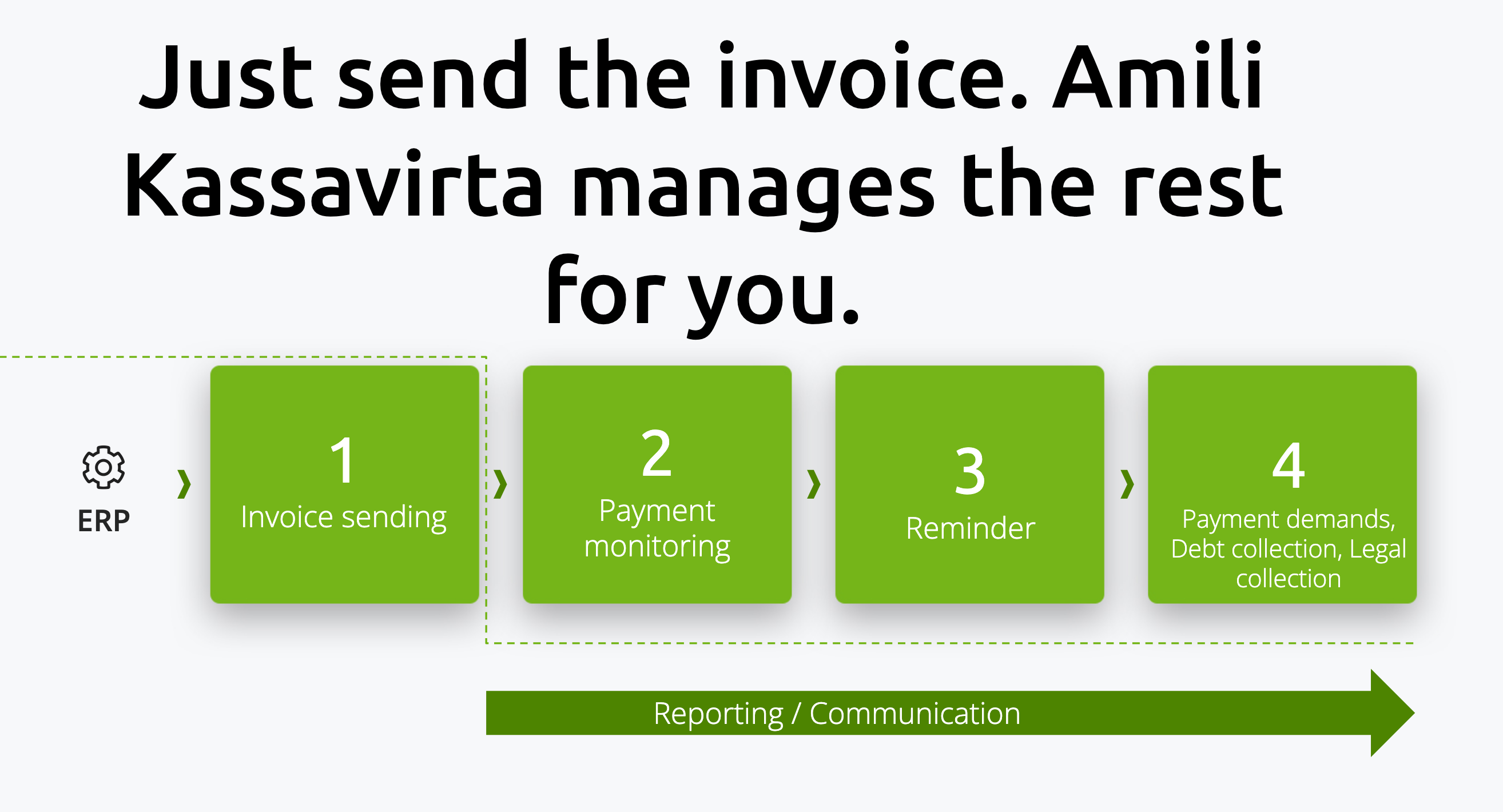
### Step-by-step default process flow
1. **Activation of the service** — Once activated, all invoices are routed through Amili Kassavirta, with a few exceptions. See [what is not routed through the service](#exceptions-for-invoices-routed-through-the-service).
2. **Invoice sending from ERP** — Send invoices from the ERP to Maventa as usual. Ensure the invoice XML is valid and meets the Amili Kassavirta [invoice content requirements](#invoice-content-requirements-and-error-handling).
3. **Invoice processing by Amili Kassavirta** — Maventa passes the invoice XML to Visma Amili. During this process, Visma Amili modifies the invoice XML. For example, the IBAN, payee information, and other relevant fields are updated to reflect Visma Amili's payment details. See the [full list of modified fields](#what-information-on-the-invoice-gets-changed).
4. **Sending modified invoice to receiver** — Since the invoice XML is modified, Maventa generates a new PDF invoice image to match the updated data. The modified invoice, the regenerated PDF, and any original attachments are then sent to the receiver through the standard Maventa process. You remain responsible for any sending errors and ensuring the invoice reaches the receiver. At this stage, an Amili Kassavirta [assignment](#assignments) is created, which can be used to track the process on Visma Amili's side.
5. **Payment** — The receiver pays the invoice using Visma Amili's payment information. Visma Amili then transfers the payment to your account. When an invoice is fully or partially paid, Visma Amili creates an [event](#events) for the assignment to indicate the payment status.
6. **Reminders and debt collection** — If the receiver does not pay on time, Visma Amili handles reminder sending according to their process schedule and, if necessary, the debt collection process. All updates can be tracked via the assignment events. Subscribe to [Receivables webhooks](https://documentation.maventa.com/integration-guide/accounts-receivable/webhooks/) to receive these updates automatically as they happen, instead of polling the API.
> [!NOTE]
> If you use your own invoice image and payment details with the service, this process does not fully apply. Learn more about [using your own invoice image and payment details](#use-of-own-invoice-image-and-payment-details).
#### Exceptions for invoices routed through the service
1. Only invoices in EUR are accepted. Invoices in other currencies bypass the service and are sent directly to the receivers, with Visma Amili not responsible for monitoring them.
2. The service does not support the following invoice XML formats: OIOXML, WoodX, BGC, Axflow, Facturae, PX, UBL.
3. Consumer e-invoices to netbanks are not routed through the service immediately after activation. There is a 7-day delay, during which all consumer e-invoices are sent directly to the banks instead of through Amili Kassavirta. This delay allows you enough time to update consumer agreements (SI-messages) with the banks. After the delay, consumer e-invoices are routed through Amili Kassavirta like all other invoices. See more in [requirements for using Amili Kassavirta with consumer e-invoicing](#requirements-for-using-amili-kassavirta-with-consumer-e-invoicing).
#### Invoice content requirements and error handling
##### Full receiver address
Invoices must include the complete address. If any part of the address is missing, the invoice will end up in an error state with an example error:
`SEND ERROR (REASON: RECEIVABLES-SERVICE: Postal code for CITY_NAME xxxxxx not found (code #5))`.
The invoice with missing address details will not be sent to the receiver. You must correct the address, create a new invoice, and resend it.
##### Due date
The invoice due date must be in the future, with at least 3 days until it is due. If the due date has passed or is within 3 days, the invoice will end up in an error state:
`SEND ERROR (REASON: RECEIVABLES-SERVICE: The due date for the invoice is within three (3) days or has already passed (code #13))`.
The invoice with a due date in the past will not be sent. Create a new invoice with a valid due date and resend it.
##### Invoice sum
The sum of the invoice lines must match the total sum of the invoice.
##### Duplicate invoice numbers
Each invoice number must generally be unique. Exceptions:
1. If a new invoice has a different invoice date than an existing assignment (open or closed), a new assignment with the same invoice number is created.
2. If a new invoice has the same invoice date as a closed assignment with no associated payments or credit notes (manually closed or cancelled by the sender), a new assignment with the same invoice number is created.
3. If a new invoice has the same invoice date as an open assignment with no payments or credit notes, and the invoice connected to that assignment is in an error state, the existing assignment is closed, and a new assignment with the same invoice number is created.
If a duplicate invoice number is not allowed, the invoice will fail with:
`SEND ERROR (REASON: RECEIVABLES-SERVICE: An assignment for this invoice number xxxx already exists and is still open. If you want to open a new assignment for this invoice number, you must first cancel the existing one (code #6 ...))`.
You must create a new invoice with a unique number and resend it. Preventing duplicate invoice numbers in the ERP is strongly recommended to avoid these errors.
> [!NOTE]
> If an invoice ends up in any error state prefixed with `SEND ERROR (REASON: RECEIVABLES-SERVICE...)`, the invoice is not sent to the receiver at all. You must correct the invoice content and resend.
##### Handling errors after sending
Invoices are sent through the Amili Kassavirta service just before the invoice leaves Maventa. Errors can occur even days after that. You are responsible for ensuring delivery:
- Wrong e-invoice address: If the receiver no longer accepts invoices at the provided e-invoice address, you must reroute the invoice. Rerouting can be done through the user interface under invoice details or via the ERP API. Rerouting does not create a new assignment.
- XML content errors: If the error is in the invoice XML, create a new corrected invoice. Credit the original erroneous invoice in the ERP and send a `credit_note` event to notify Visma Amili to close the assignment. Automating this process in the ERP is strongly recommended. The new invoice must use a new invoice number to avoid duplicate number errors.
> [!WARNING]
> If the original invoice ends up in the error state and you do not act on it, and if the invoice remains in error state even when the invoice is due, Visma Amili closes the assignment and adds a comment about the closing reason to the assignment details.
#### What information on the invoice gets changed
- IBAN – Visma Amili replaces the payment information on the invoice with their own IBAN. This ensures the receiver pays Visma Amili, who then transfers the funds to you using the account provided in the service activation. The original invoice reference number is used for the payment.
- Reference number – Visma Amili replaces the reference number on the invoice with their own.
- Factoring clause – Visma Amili adds a factoring clause to indicate that the invoice has been assigned to them for payment handling. This informs the receiver to pay Visma Amili instead of the original sender. You can specify your own contact email and phone number for the factoring clause during the activation process.
- InvoiceFreeText – Visma Amili adds new InvoiceFreeText elements to provide a link to their customer service for the receiver:
"VERKKOPALVELU: https://www.laskuhelposti.fi/ KIRJAUTUMISTUNNUS: xxxx." Existing InvoiceFreeText elements are not overwritten; the new ones are added.
- Modified Finvoice XML elements – The following XML elements are updated:
SellerAccountDetails, EpiBfiIdentifier, EpiBeneficiaryPartyDetails, EpiReference, EpiRemittanceInfoIdentifier, VirtualBankBarcode, FactoringAgreementIdentifier, FactoringFreeText, InvoiceFreeText
- Invoice image – Maventa generates a new invoice image from the modified XML to ensure the receiver sees the correct information.
> [!NOTE]
> If you use your own invoice image and payment details with the service, some of these changes do not apply. Learn more about [using your own invoice image and payment details](#use-of-own-invoice-image-and-payment-details).
### Reminder and debt collection schedule
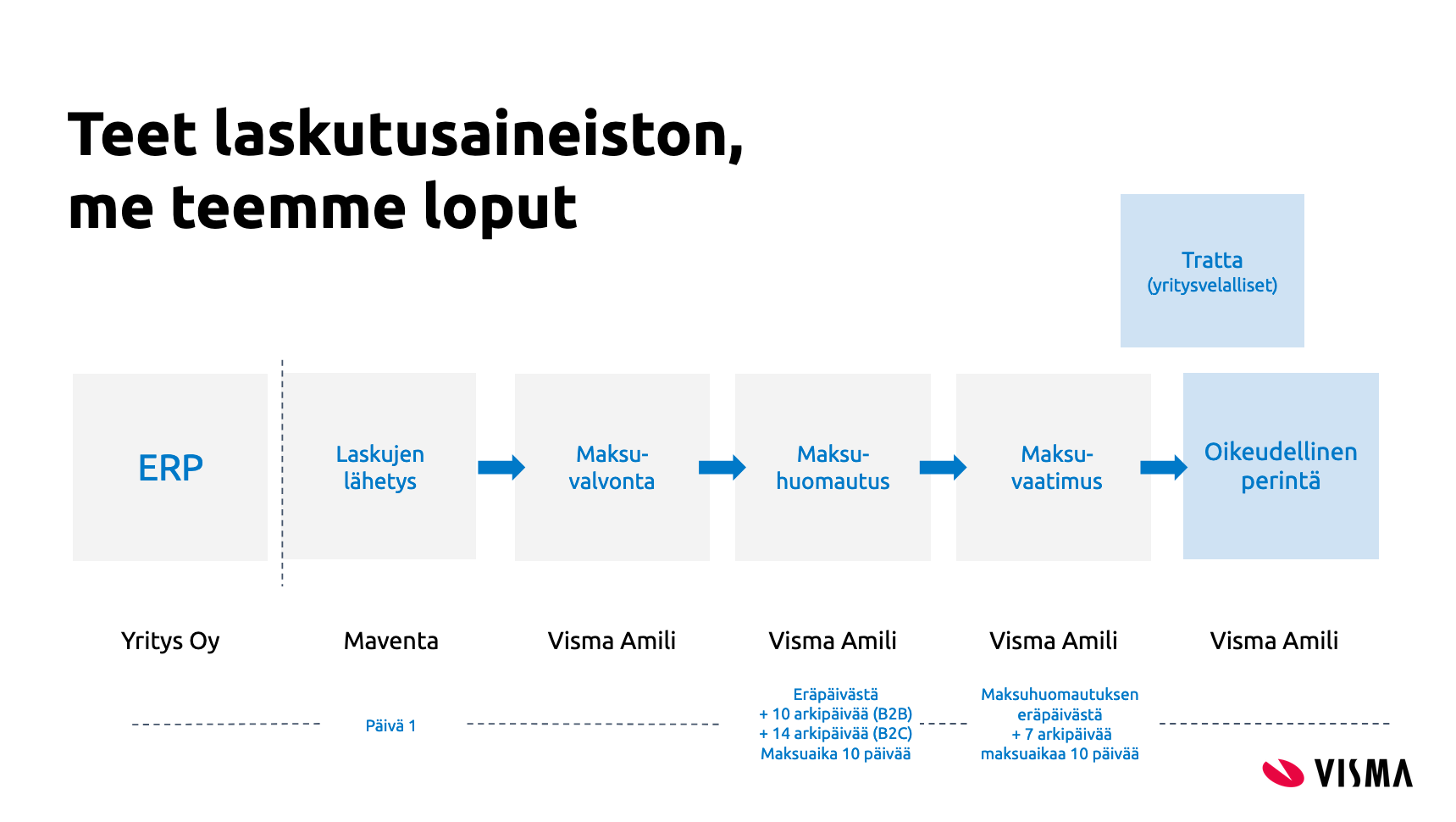
If the receiver does not pay the invoice on time, Visma Amili sends a reminder. For B2B invoices, Visma Amili sends the first reminder 10 days after the due date. For consumer invoices (B2C), the first reminder is sent 14 days after the due date. Reminders are always sent by regular post. Letters are not sent on weekends or public holidays, which may add a few extra days to the schedule.
The customer's language code in the original invoice (Finvoice InvoiceRecipientLanguageCode) determines the language of reminders and debt collection letters. If no language is specified, Finnish is used as the default.
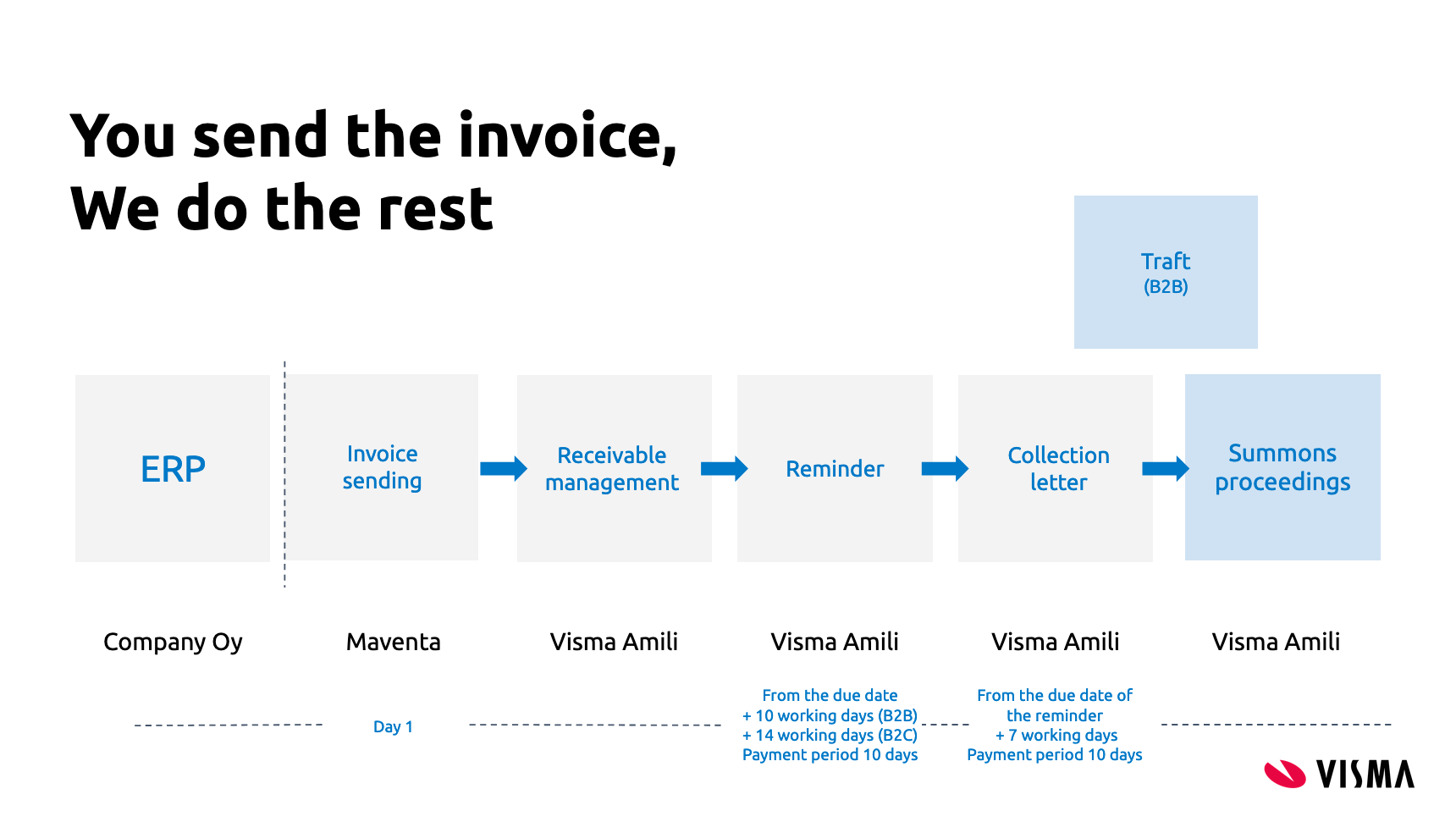
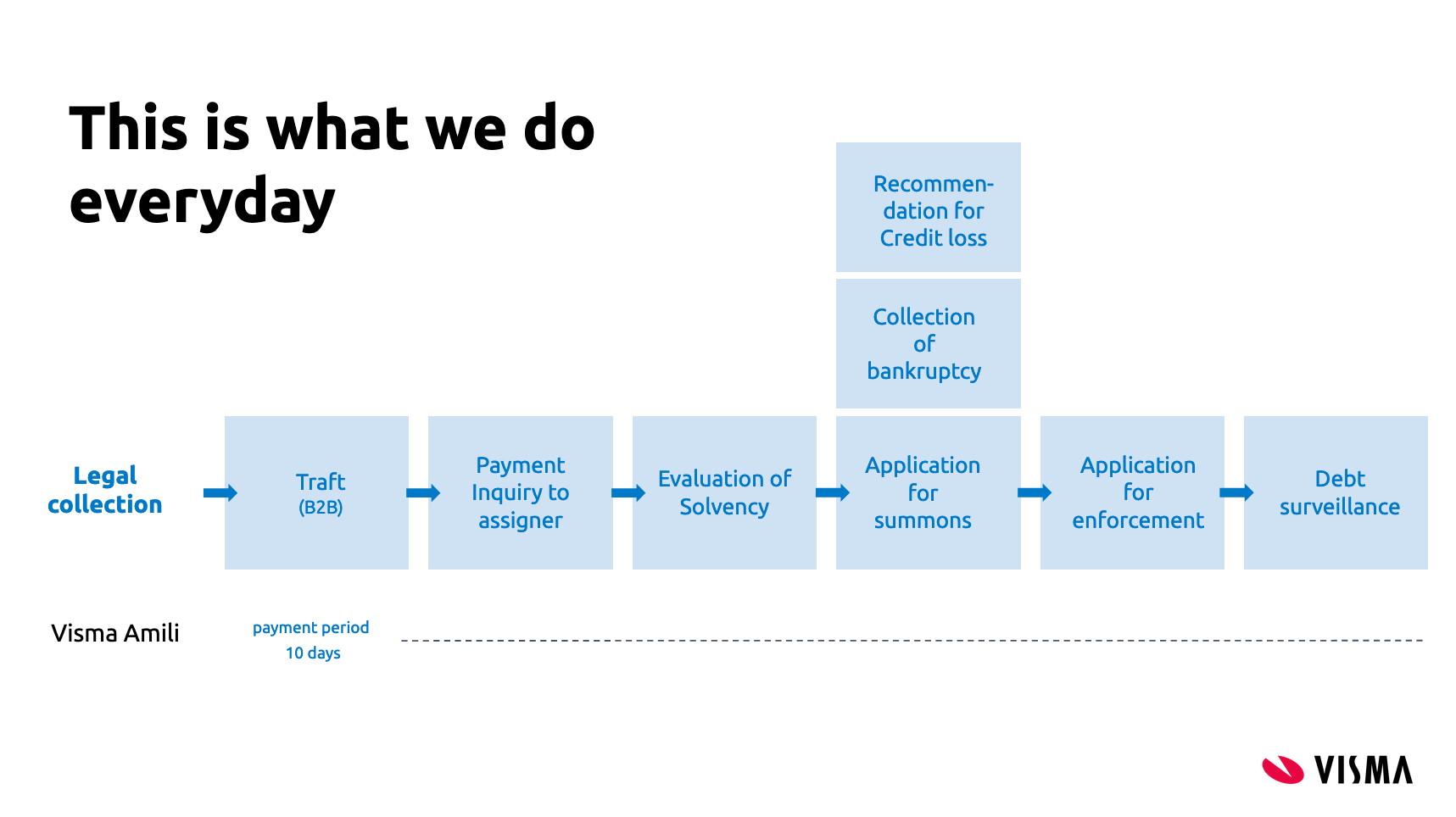
Schedule in Finnish
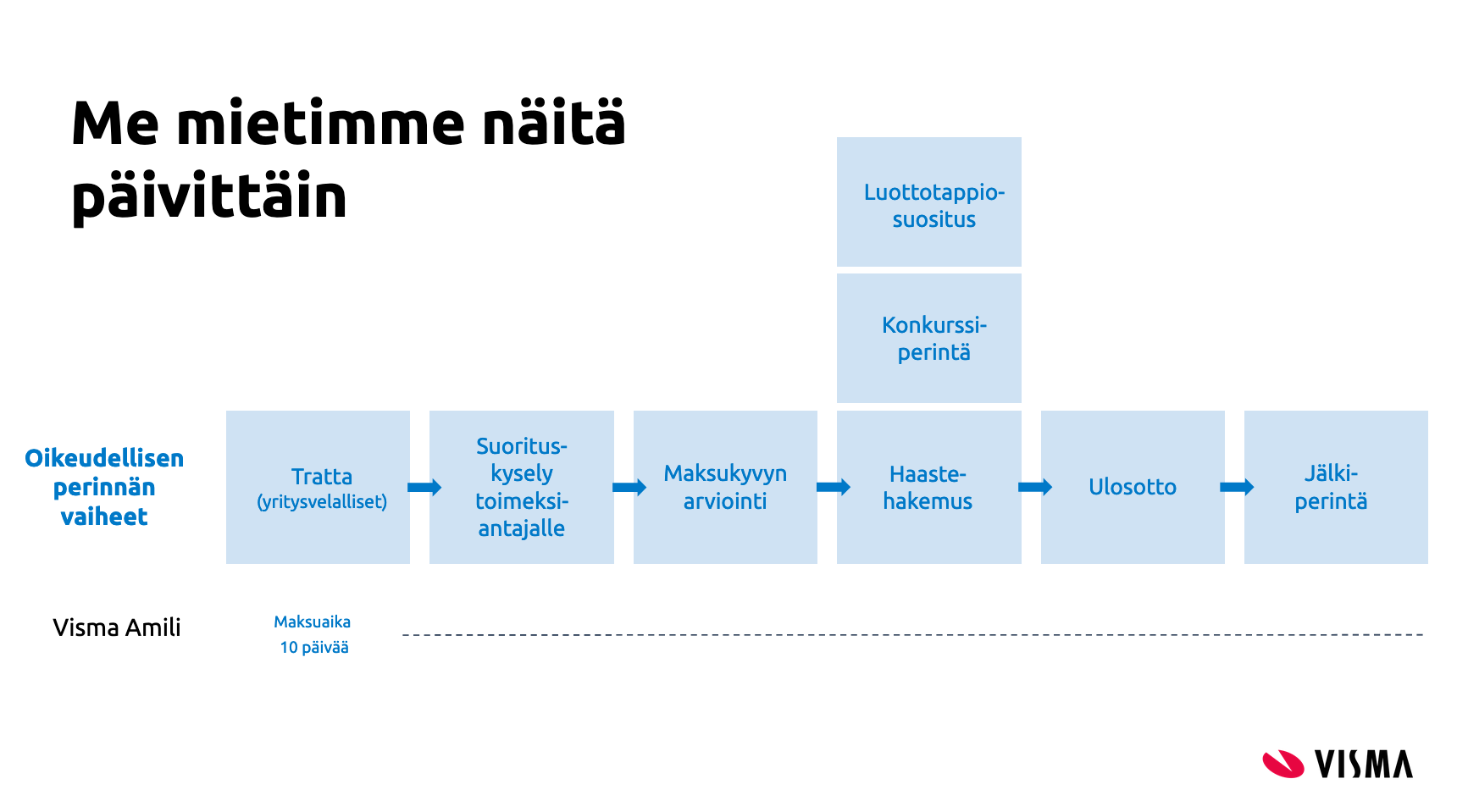
> [!WARNING]
> This reminder and debt collection schedule does not apply if the customer has VIP or PREMIUM service level set.
## Activating the Amili Kassavirta service
To activate the Amili Kassavirta service, use the REST API method [`PUT /v2/services/amili/receivables`](https://swagger.maventa.com/?urls.primaryName=STAGE+-+AutoXChange+API#/services/putV2ServicesAmiliReceivables) to start the activation process. You can track the activation status using [`GET /v2/services/amili/receivables`](https://swagger.maventa.com/?urls.primaryName=STAGE+-+AutoXChange+API#/services/getV2ServicesAmiliReceivables).
Activation requires a company representative authorised to act on behalf of the company to complete and sign an electronic agreement with Visma Amili. Authorisation can be based on the individual's position in the company or a power of attorney, which must be attached if applicable. Personal online banking credentials or Mobile ID are needed to complete the form, as required under the Money Laundering Act.
Maventa's partner, Netvisor KYC, handles the authentication and signing process.
There are two ways to handle the KYC step from the ERP:
1. **Authorisation email** – By providing an email address in the `authorization_email` parameter, a link to the Netvisor KYC service is sent to that address. If this parameter is left empty, no email is sent.
2. **Direct link from ERP** – The [`GET /v2/services/amili/receivables`](https://swagger.maventa.com/?urls.primaryName=STAGE+-+AutoXChange+API#/services/getV2ServicesAmiliReceivables) method returns a link in the `activation_url` parameter to the Netvisor KYC service. This link can be displayed directly in the ERP. If using this method, leave the `authorization_email` parameter blank.
> [!NOTE]
> If the KYC process is not completed within a week, a reminder email is sent to the contact person with the activation link.
### Information needed for the activation
Parameters for the [`PUT /v2/services/amili/receivables`](https://swagger.maventa.com/?urls.primaryName=STAGE+-+AutoXChange+API#/services/putV2ServicesAmiliReceivables) call
| Parameter | Description |
| ----------------------------- | ---------------------------------------------------------------------------------------------------------------------------------------------------------------------------------------------------------------------------------- |
| iban | The account (IBAN) where Visma Amili will transfer the funds collected from the invoice recipient. Only one account can be used. |
| bic | Bank identification code e.g. DABAFIHH |
| bank | Name of your bank |
| contact_person | Contact person name |
| contact_email | Email for possible problem cases and contacting |
| contact_phone_number | Phone number for the contact person |
| authorization_email | Email for sending the request to sign the electronic agreement. If left blank, email is not sent |
| accountable_party | "vfsfi" (default) or "company". If set as "vfsfi" Visma Amili's account details are used. If "company", company's own account details are used (only allowed for certain vendors) |
| service_type | "full" Amili Kassavirta (default). "express" [Amili Perintä](https://documentation.maventa.com/integration-guide/accounts-receivable/amili-perinta/) |
| customer_service_email | This email will appear in the factoring clause that Visma Amili adds to invoices routed through the Amili Kassavirta service. |
| customer_service_phone_number | This phone number will appear in the factoring clause that Visma Amili adds to invoices routed through the Amili Kassavirta service. |
| billing_address | Billing address for possible service costs related to the debt collection processes in the later phase. [Price list](https://amili.fi/hubfs/Sopimusehdot/Visma-Amili-yleiset-sopimusehdot-08-26.pdf) |
| postal_address | Company's postal address |
Once the agreement is signed and verified by Visma Amili, the service will be activated, usually within 1–2 business days. You can use [`GET /v2/services/amili/receivables`](https://swagger.maventa.com/?urls.primaryName=STAGE+-+AutoXChange+API#/services/getV2ServicesAmiliReceivables) to check the activation status, or register a webhook to receive a notification from Maventa when the service is activated or rejected.
> [!NOTE]
> If you have consumer invoicing enabled, you must add the IBAN provided by Visma Amili to your sender info agreements (SI-messages). The IBAN is returned as a parameter in the `GET /v2/services/amili/receivables` response. Learn more in [requirements for using Amili Kassavirta with consumer e-invoicing](#requirements-for-using-amili-kassavirta-with-consumer-e-invoicing).
The Amili Kassavirta service can also be activated through the Maventa user interface.
#### How to change information given in the activation
If you need to update company information, please contact your support team, as this cannot currently be done through the API.
### Requirements for using Amili Kassavirta with consumer e-invoicing
If Finnish consumer invoicing is enabled for your company, you must update your consumer agreements before Amili Kassavirta can handle e-invoices to netbanks. There is a mandatory 7-day transition period after activation. During this period, all consumer e-invoices are sent directly to banks and do not pass through Amili Kassavirta. After the transition, consumer e-invoices are routed through the service like all other invoices.
#### Key requirements for B2C messaging
To use Amili Kassavirta with consumer e-invoicing, you must update your consumer sender agreements (SI messages) with the following:
1. Add Visma Amili's IBAN
Include the IBAN provided by Visma Amili as one of the accounts used for consumer e-invoices. All IBANs that may ever appear on your e-invoices must be listed in the SI-message, as banks will reject invoices containing any IBAN not included in the message. It is recommended to add the new IBAN as an additional account rather than replacing existing accounts.
2. Update the SellerInvoiceIdentifierType
This defines the identifier consumers must provide when adding the company as a sender in their netbank. Using a reference number is not recommended.
Some banks use automated routines to identify the seller based on the reference number, IBAN, and beneficiary name. When using Amili Kassavirta, the invoices contain Visma Amili's IBAN and beneficiary name. This could cause the consumer to inadvertently create an agreement with Visma Amili instead of your company when a bank suggests an e-invoicing agreement.
Reference numbers are also problematic because the number sent from the ERP differs from the one received by the consumer, as Visma Amili modifies it during processing. If your ERP uses reference numbers to link new consumer agreements, you must retrieve the reference number used by Amili Kassavirta from the assignment details (`GET /v1/assignments/{assignment_id}`, parameter `reference_ids`, type `number`) and connect it in your register.
If you are currently using SellerInvoiceIdentifierType as 01 (national reference number) or 02 (international RF reference), you should change it to 08 (other numeric identifier), 09 (other alphanumeric identifier) or 99 (other identifier) in the SI-message, for a type that banks do not validate.
#### How to make the changes
Create CHANGE-type SI messages for each bank you have an agreement with. Add the new IBAN as one of the seller accounts and update the SellerInvoiceIdentifierType to a more suitable type as described in the previous section.
### Use of own invoice image and payment details
You can choose to use your own invoice image and payment details when sending invoices through the Amili Kassavirta service. When this option is enabled, Visma Amili will not modify the payment information, and Maventa will not replace the original invoice image as it normally does in the standard process.
If you use your own payment details, all payments are made directly to your account. In this setup, the ERP must support the full Amili Kassavirta integration, including an automated process for reporting direct payments to Visma Amili via API. This is required so that Visma Amili can correctly update the assignments (mark as paid/closed). See more about handling payments under the [events](#events) section.
#### Restrictions and requirements
Because all payments (except those paid by VISMA AMILI / VISMA FINANC) must be reported as direct payments through the API, this option is only available for selected ERP vendor keys that have been verified to have a reliable, automated direct-payment reporting solution.
If you wish to enable this feature for your integration, please contact Maventa support to request verification and approval.
> [!WARNING]
> Do not report payments where the payer name starts with "VISMA AMILI" as direct payments. These are reminder/payment demand payments to your company made by Visma Amili.
#### Configuring who receives the payments
During service activation, the parameter `accountable_party` defines who receives the payments:
| Value | Who receives the payment | Invoice/payment details | Notes |
| ------------------- | ------------------------ | ----------------------------------------------------------- | ---------------------------------------- |
| `vfsfi` *(default)* | Visma Amili | Service modifies invoice details, Amili's payment details | Default process |
| `company` | Sender (your company) | Company's original payment details & invoice image are used | Direct payments must be reported via API |
If `accountable_party` is not set, the default value `vfsfi` is applied. The parameter can also be updated later via: [`PATCH /v2/services/amili/receivables`](https://swagger.maventa.com/?urls.primaryName=STAGE+-+AutoXChange+API#/services/patchV2ServicesAmiliReceivables) → set `accountable_party` = "company".
## Service levels for customers
If you want to limit debt collection for a specific customer, you can add them to a VIP or PREMIUM customer group. The default service level is the most efficient option for cash flow and requires no action. Adding a customer to a VIP or PREMIUM group transfers the responsibility for monitoring assignments, preventing expirations, etc., to you. In some cases, this may incur additional costs.
Grouping works based on the customer's business ID, so ensure it is correct both in your records and in the invoice XML when sending. If you later decide to return to the standard debt collection for a customer, simply remove their business ID from the group. Updating a customer group does not affect assignments that have already been closed.
Service levels can be managed via the API using [`PATCH /v1/service_levels/{customer_bid}`](https://swagger.maventa.com/?urls.primaryName=STAGE+-+AutoInvoice+Receivables+API#/service_levels/patchV1ServiceLevelsCustomerBid).
On an assignment, the parameter `service_level` reflects the group: "VIP" or "PREMIUM" if the customer is in one of those groups and "default" if not in a VIP or PREMIUM group.
A `service_level_changed` event is also logged if the service level is VIP or PREMIUM.
> [!NOTE]
> Service level updates may take a few hours to appear after an invoice is sent and the assignment is created.
### DEFAULT customers
This is the standard payment monitoring process. It is the most efficient for cash flow and requires no action.

### PREMIUM customers
- A payment reminder and demand for payment are sent for overdue invoices.
- Collection ends 30 days after the due date of the demand for payment. After this, monitoring and managing the receivable is the sender's responsibility.
- If the invoice is unpaid, a fee of 30€ + VAT applies for the sender.

### VIP customers
- Only a payment reminder is sent for overdue invoices. No reminder fee is charged to the customer, but the sender is billed for a 5€ + VAT fee for each reminder.
- Collection ends 30 days after the due date of the payment reminder, and the case is closed. After this, monitoring and managing the receivable is the sender's responsibility.

### No payment monitoring
- Invoices for these customers will not be sent through the Amili Kassavirta service.
- The sender's own account number will be used for payments.
- The sender is responsible for monitoring, controlling, and managing these receivables.
- No additional costs are charged for this option.
## Assignments
Every invoice sent through the Amili Kassavirta service automatically generates an assignment. An assignment represents the invoice's lifecycle within Visma Amili and is used to track its status, payment progress, and all communication between Visma Amili and you.
Each assignment contains the fields `reference_ids` and `invoice_id`, which link the assignment to the original invoice using the invoice UUID.
Assignments can have one of three statuses:
- Open – The invoice is still unpaid and Visma Amili continues monitoring and processing it.
- Partially closed – The invoice has been paid, but additional fees or charges remain for Visma Amili to collect.
- Closed – The invoice and all related charges are fully paid, and Visma Amili has transferred the funds to the company, or the assignment has been credited or closed otherwise.
[REST API](https://swagger.maventa.com/?urls.primaryName=STAGE+-+AutoInvoice+Receivables+API#/assignments/getV1Assignments) for assignment handling.
### Assignment content
| Parameter | Description |
| ---------------------|-----------------------------------------------------------------------------------------------------------------------------------------------------------------------------------------------------------------------------------------------------------------------------------------------------------------------|
| id | Assignment id |
| status | Open (unpaid) / closed (paid or cancelled) / partially_closed (Invoice is paid but additional fees or charges remain for Visma Amili to collect) |
| collection_status | Collection status of the assignment. Set based on event added by the agency. Values can be "unknown" (default value until reminder is sent/collection process starts), "reminder_sent", "debt_collection", "legal_collection", "recovery_proceedings", "debt_surveillance", "lack_of_means", "payment_plan" |
| service_level | default (normal process) / premium / vip |
| debtor | "name": Name of customer (receiver of the invoice) and "bid": customer's bid |
| due_date | Due date from the original invoice or new due date if due date change request is accepted |
| issued_at | Invoice date from the original invoice |
| number | Invoice number from the original invoice |
| sum | Total sum of the invoice |
| paid | Amount that is paid or credited |
| currency | Currency from the original invoice |
| created_at | When assignment was created |
| updated_at | When assignment was updated last time (e.g. when paid sum was updated) |
| partially_closed_at | When assignment was partially closed by Visma Amili |
| closed_at | When assignment was closed by Visma Amili |
| reference_ids | Contains three ids: "agency_id" = collection agency id, "invoice_id" = id of the original invoice (invoice uuid), "number" = New reference number that was changed to the original invoice |
JSON example of assignment and its event
```json
[
{
"id": "fa9781ba-20d1-4677-a125-f04bff7bbac0",
"status": "open",
"collection_status": "unknown",
"service_level": "default",
"debtor": {
"name": "Hanna's Test Company"
},
"due_date": "2020-04-20",
"issued_at": "2020-04-01",
"number": "64488",
"sum": 12.3,
"paid": 10,
"currency": "EUR",
"created_at": "2020-04-15T05:47:07Z",
"partially_closed_at": null,
"updated_at": "2020-04-15T21:01:18Z",
"closed_at": null,
"reference_ids": [
{
"type": "agency_id",
"value": "078dbb88-ef8e-4115-8260-c8a542aaa87c"
},
{
"type": "invoice_id",
"value": "f6dcf18d-a1bd-4e72-bb8a-80908527b6c8"
},
{
"type": "number",
"value": "356241887794"
}
],
"events": [
{
"id": "c0c56722-a28b-49d1-aa87-1c4d7f3cf1af",
"type": "paid",
"data": {
"sum_paid": 10,
"booked_at": "2020-04-16",
"archive_number": "12345"
},
"party_id": "938fc79f-9c00-47af-8507-cdf15838aa96",
"seens": [
{
"seen_at": "2020-04-15T22:00:06Z",
"seen_by": "Visma Amili FI"
}
],
"created_at": "2020-04-15T21:01:18Z",
"happened_at": "2020-04-16T00:00:00Z"
}
]
}
]
```
### Collection status of the assignment
| collection_status | Events that set the collection status |
| ----------------------|-----------------------------------------------------------------------------------------------|
| unknown | Default value until reminder is sent or collection activities are started |
| reminder_sent | reminder_sent / second_reminder_sent |
| debt_collection | collection_started (first payment demand is sent) / second_demand_sent / tratta |
| legal_collection | legal_collection_started |
| recovery_proceedings | application_for_enforcement |
| debt_surveillance | credit_loss_suggestion (credit_loss event does not change the collection status) |
| lack_of_means | lack_of_means |
| payment_plan | payment_plan |
#### Creating assignments manually (without sending the invoice to the recipient)
Assignments can also be created for the Amili Kassavirta service without delivering an invoice to the customer. This is useful in cases where the invoice itself has already been communicated to the recipient outside Maventa.
A common use case is housing companies: they often send one annual invoice covering the entire year, but still need to track and monitor monthly payments. By creating assignments manually each month, payment reminders and collection processes can be triggered automatically if payments are late.
Manual creation of assignments is done via [`POST /v1/invoices`](https://swagger.maventa.com/?urls.primaryName=STAGE+-+AutoXChange+API#/invoices/postV1Invoices) using the parameter `prevent_routing` = true.
When this parameter is enabled, the invoice is marked as SENT immediately, without any delivery to the receiver, and an assignment is created in Amili Kassavirta for normal monitoring.
To use this method, you must provide a valid invoice XML including full recipient address details and a due date in the future. This functionality is restricted to approved ERPs (vendor keys). If you want to enable it, please contact the Maventa support team to validate your integration and be added to the allowed list.
> [!NOTE]
> Remember to report payments for these invoices as direct payments, as they were originally sent to the receiver with the sender's own payment details. This means the receiver will pay directly to the sender's account, not through Visma Amili.
> [!NOTE]
> Creating the assignment is free of charge. The `POST /v1/invoices` call itself is billed as a normal invoice sending (debit action) according to your existing price list, even though the invoice is not delivered to the receiver (`prevent_routing` parameter used).
## Events
Both the sender company and Visma Amili can add events to communicate changes related to an assignment. Events describe actions that have taken place — for example, when a customer pays an invoice, Visma Amili automatically adds a `paid` event. Events can also be used to update assignment details from the sender side, such as requesting a new due date or notifying about direct payments. In practice, events serve as a communication channel between Visma Amili and the sender.
> [!NOTE]
> To be notified when Visma Amili adds an event to an assignment — a reminder sent, a payment received, the case moving to collection, or the assignment closing — subscribe to [Receivables webhooks](https://documentation.maventa.com/integration-guide/accounts-receivable/webhooks/) instead of polling the API. Events your integration is responsible for, such as `paid` (direct payments) and `credit_note`, must still be sent by the ERP.
Automating event creation from your ERP is strongly recommended. At minimum, automate the `paid` and `credit_note` events to ensure they are always delivered to Visma Amili without relying on end users to manually trigger them via the UI.
[REST API](https://swagger.maventa.com/?urls.primaryName=STAGE+-+AutoInvoice+Receivables+API#/assignments/postV1AssignmentsAssignmentIdEvents) for event handling.
### Event types and usage
Comment or question
`comment` – Add a comment or ask a question.
This event allows you to send comments or questions to Visma Amili regarding the specific assignment. Visma Amili may also use this event type to send comments or questions back to your company.
Monitoring comment events closely is strongly recommended. A good approach is to create a dedicated view that displays only comment events, clearly separating them from other event types. This ensures that you can easily see when Visma Amili has added a comment or question that may require attention or a response.
A new and improved messaging feature is now available for better two-way communication. See the [messaging functionality](#messaging-functionality) section for more details.
**Both the company and Visma Amili can create this event type.**
Handling payments
`paid` – Used to report payments made by the customer, notify direct payments, and mark credit notes as used.
Usage scenarios:
1. Customer payment through Visma Amili.
Visma Amili sends a paid event when the customer pays the assignment, either fully or partially.
- If the assignment is fully paid, Visma Amili will automatically close it (`close` event added).
- If the customer pays more than the invoice amount, the excess is refunded to the customer. Visma Amili does not retain overpayments for future invoices.
- In account statements (such as SEPA), payments processed by Visma Amili appear with `VISMA AMILI` as the payer name (length may vary depending on bank). This can help distinguish payments by Visma Amili from direct payments, which will show a different payer name.
2. Reporting direct payments
Use this event to inform Visma Amili when the customer pays directly to the sender company's account. Payments may be full or partial.
- If additional details are needed, they can be provided using a comment event.
- If the assignment is fully paid, Visma Amili will close it (`close` event added).
> [!WARNING]
> It is very important that direct payments are reported through this event so that Visma Amili can update the open balance or close the assignment correctly.
> Automating this event in the ERP is strongly recommended to ensure direct payments are always reported.
3. Marking a credit note as used
When a credit note has been issued and linked to an assignment (`credit_note` event), it must be marked as used. This is done using the paid event for the credit note, with the payment amount entered as a negative value.
- This allows Visma Amili to close the credit note (`close` event added).
- If the credit note is linked through the UI, it is automatically marked as used.
The `paid` event updates the paid field in the assignment, but does not modify the sum value.
```json
{
"type": "paid",
"data": {
"sum_paid": 200.5,
"booked_at": "2019-01-04",
"archive_number": "12345"
}
}
```
**Both the company and Visma Amili can create this event type.**
Closing an assignment
`close` – Visma Amili uses this event to mark an assignment as closed. An assignment is closed when any of the following occurs:
- the customer has fully paid the assignment
- you report that it has been fully paid (direct payment)
- you report that it has been fully credited
- you request cancellation of the assignment
Once closed, no further collection activity is carried out for that assignment.
**Only Visma Amili can create this event type.**
Partially closing an assignment
`partially_closed` – Visma Amili uses this event to indicate that an assignment is only partially closed. This situation occurs when the original invoice amount has been fully paid by the customer, but reminder fees or collection charges remain unpaid.
From the sender's perspective the assignment is finished, but the customer still owes an additional amount to Visma Amili. When this event is added, the assignment status changes to partially_closed.
Once the customer pays the remaining reminder or collection charges, Visma Amili will add a `close` event and the assignment status will update to closed.
Closure cannot be reversed or modified.
**Only Visma Amili can create this event type.**
Handling due date changes
Request a due date change
`due_date_change_request` – Use this event to request a change to the due date of an assignment. Visma Amili will review the request and either accept or reject it based on the proposed new due date and the current stage of the collection process.
- If the debt collection process has already started, the request will be rejected.
- If the request is accepted, the assignment will receive a confirmation via the `due_date_changed` event, and the assignment's due_date parameter will be updated accordingly.
- If rejected, a `comment` event will be sent with the reason for the rejection.
**Only the company can create this event type.**
Due date change confirmation
`due_date_changed` – Visma Amili sends this event when a due date change request has been approved. It updates the assignment's due_date parameter to reflect the new due date.
> [!NOTE]
> This does not update the original invoice.
**Only Visma Amili can create this event type.**
Connecting a credit note to an assignment
`credit_note` – Use this event to link a credit note to an assignment. Provide the credit note number and the credit sum when sending this event. The credit sum should be entered as a positive value.
- If the credit note fully covers the assignment, Visma Amili will close the assignment (`close` event added).
- If the credit note was issued through Maventa, you also need to mark it as used by sending a `paid` event for the credit note assignment, with the amount entered as a negative value.
- If the credit note was issued outside Maventa, this event should still be sent to Visma Amili to update the assignment.
- If only part of the assignment is credited, Visma Amili will continue monitoring payments and follow the debt collection process for the remaining amount.
Summary when the whole assignment is credited:
- Assignment receives a `credit_note` event with the credit sum as a positive value.
- Credit note receives a `paid` event with the paid sum as a negative value.
Automating this event in your ERP is strongly recommended to ensure that a `credit_note` event is always sent when credit notes are created.
**Only the company can create this event type.**
Cancellation of the assignment
`cancel` – Use this event to cancel the entire Amili Kassavirta process for an assignment.
- Once cancelled, the assignment will be closed (`close` event added), and the closure cannot be reversed or modified.
- Visma Amili will no longer monitor the assignment or take any collection actions. You become fully responsible for tracking the assignment.
- Do not use this event to report a credit loss.
> [!NOTE]
> If reminder or collection actions have already started, Visma Amili will charge a cancellation fee.
**Only the company can create this event type.**
Temporary suspension of debt collection
Request or update suspension
`freeze` – Use this event to request a temporary suspension of the debt collection process for a specific assignment until a specified date.
- Once the suspension is set, Visma Amili will not monitor the assignment or take any collection actions. You become responsible for tracking the assignment during this period.
- Suspension requests can be made only if legal collection has not started and the enforcement authority has not declared the customer insolvent.
- The debt collection process will automatically resume after the suspension end date.
- You can update the suspension by providing a new end date, or end it early by setting the expiration date to today.
Set the parameter "frozen" to true:
```json
{
"type": "freeze",
"data": {
"frozen": true,
"end_date": "2019-01-04"
}
}
```
**Only the company can create this event type.**
Suspension confirmation
`freeze_confirmed` – Visma Amili sends this event to confirm that a temporary suspension has been applied to an assignment.
```json
{
"type": "freeze_confirmed",
"data": {
"happened_at": "2019-01-04",
"end_date": "2019-02-15"
}
}
```
**Only Visma Amili can create this event type.**
Termination of suspension
`unfreezed` – Visma Amili sends this event when the temporary suspension has ended and debt collection for the assignment will resume.
```json
{
"type": "unfreezed",
"data": {
"happened_at": "2019-01-04"
}
}
```
**Only Visma Amili can create this event type.**
Information for interest payments
`interest_paid` – Visma Amili uses this event to notify when interest has been paid for an assignment and to provide the interest amount. It is typically received alongside the paid event.
- Interest payments are made daily, with each payment covering all interest accrued on that day.
- In account statements, the payment will appear with the message: "Korkotilitys PVM".
- The interest in this context is defined by the sender on their invoices for late payments.
> [!NOTE]
> Interest must be specified in the invoice XML. Including it only on the invoice image is not sufficient.
**Only Visma Amili can create this event type.**
Cash discount applied
`cash_discount` – Visma Amili uses this event to notify if the customer has applied a cash discount on the payment and to indicate the discount amount.
- The sum of the paid amount and the cash_discount amount equals the total assignment sum.
- This event is typically received together with the paid event.
**Only Visma Amili can create this event type.**
When the first reminder is sent to the customer
`reminder_sent` - Visma Amili adds this event when the first payment reminder for an unpaid invoice has been sent. If the assignment's `collection_status` is not already set to `reminder_sent`, the event will update it accordingly.
**Only Visma Amili can create this event type.**
When the second reminder is sent to the customer
`second_reminder_sent` - Visma Amili adds this event when the second payment reminder for an unpaid invoice has been sent. If the assignment's `collection_status` is not already set to `reminder_sent`, the event will update it accordingly.
**Only Visma Amili can create this event type.**
When the first payment demand is sent to the customer
`collection_started` - Visma Amili adds this event when the first payment demand for an unpaid invoice has been sent. If the assignment's `collection_status` is not already set to `debt_collection`, the event will update it accordingly.
**Only Visma Amili can create this event type.**
When the second payment demand is sent to the customer
`second_demand_sent` - Visma Amili adds this event when the second payment demand for an unpaid invoice has been sent. If the assignment's `collection_status` is not already set to `debt_collection`, the event will update it accordingly.
**Only Visma Amili can create this event type.**
When the tratta is sent
`tratta_sent` - A tratta has been issued for an unpaid invoice. This event will update the assignment's `collection_status` to `debt_collection` if it has not already been set.
**Only Visma Amili can create this event type.**
Legal collection is started
`legal_collection_started` - A summons application has been submitted and the legal collection process for the assignment has begun. This event will update the assignment's `collection_status` to `legal_collection`.
**Only Visma Amili can create this event type.**
An application for enforcement is sent
`application_for_enforcement` - An application for enforcement has been submitted and the assignment has been transferred to the enforcement authority. This event will update the assignment's `collection_status` to `recovery_proceedings`.
**Only Visma Amili can create this event type.**
The enforcement authority has found the debtor insolvent
`lack_of_means` - The enforcement authority has declared the debtor insolvent. This event will update the assignment's `collection_status` to `lack_of_means`.
**Only Visma Amili can create this event type.**
A payment plan has been agreed on the invoice
`payment_plan` - A payment plan has been agreed on the invoice. This event will set the `collection_status` of an assignment to `payment_plan`.
**Only Visma Amili can create this event type.**
A recommendation to mark the assignment as credit loss
`credit_loss_suggestion` - A recommendation from Visma Amili to mark the assignment as credit loss. This event will set the `collection_status` of an assignment to `debt_surveillance`.
**Only Visma Amili can create this event type.**
Marking an assignment as credit loss
`credit_loss` – You can mark the assignment as a credit loss for accounting purposes. Reporting a credit loss does not affect payment control or monitoring, and Visma Amili will continue the collection process as usual.
Visma Amili may recommend marking an assignment as a credit loss if it is known that the customer will not pay.
Once submitted, a credit loss entry cannot be reversed or modified.
**Only the company can create this event type.**
Service level of the customer
`service_level_changed` - Visma Amili creates this event if the customer of the invoice (receiver) is either on the VIP or PREMIUM service level group. If the service level group is changed, a new event is added. This event will set the `service_level` of an assignment to default / vip / premium based on the chosen service level group.
**Only Visma Amili can create this event type.**
### Other events
Delivery status of the original sent invoice
`delivery_status` - This event is mainly created for Visma Amili to follow up if the original invoice sending has been successful or if it has failed. This is the only way they can get the information. If the original invoice ends up in the error state and you do not act on it, and if the invoice remains in error state even when the invoice is due, Visma Amili closes the assignment and adds a comment about the closing reason to the assignment details.
As an ERP integrator, this event might not bring any additional value in your implementation if you are already following up the statuses of sent invoices through the invoice APIs and communicating the errors to the user. In this case, these events can be filtered out.
If you want to show these events for the users, there are a few things to consider when implementing them:
- There will always be at least one delivery_status "DELIVERED" when the invoice is successfully sent. But in most cases there are multiple delivery_status events with status "DELIVERED" depending on the receiving operator. Maventa creates one for each update on the invoice. It might not be necessary to show them all for the user.
- If there is delivery_status "FAILED", the original invoice related to the assignment is in error state. You need to take action, for example reroute the failed invoice using another route so that it reaches the receiver. After the original invoice is rerouted and sent successfully, a new delivery_status "DELIVERED" is added for the assignment. This is important to show.
- In the Maventa UI, only the first "DELIVERED" event is shown and all the extra ones are filtered out in case they are "DELIVERED" and there are no "FAILED" ones in between. But if the invoice ends up in the error state and delivery_status "FAILED" is added, that is shown. And then the delivery_status events after the "FAILED" ones to update the correct status for the assignment.
**Only Maventa can create this event type.**
## Messaging functionality
Messaging enables two-way communication between Visma Amili and the customer. Customers can add comments or questions related to their assignments, and Visma Amili can send important information concerning the assignments.
Including this functionality in the integration is strongly recommended to ensure a reliable communication channel and prevent important messages from being missed.
[APIs for handling messages](https://swagger.maventa.com/?urls.primaryName=STAGE+-+AutoInvoice+Receivables+API#/message_threads).
## Reporting tool
The receivables reporting tool gives you better insight into your receivables and collections activity. Reports can be downloaded for a selected date range (up to 365 days). Two report types are currently available:
- Settlement Report: Provides a summary of all settlements made during the chosen period.
- Credit Loss Recommendation Report: Highlights potential credit losses based on historical data.
Both reports are available in PDF and Excel formats. You can choose the one that suits your needs, whether it's for quick viewing or deeper data analysis.
[APIs for reporting tool](https://swagger.maventa.com/?urls.primaryName=STAGE+-+AutoInvoice+Receivables+API#/reports)
## Tips for integrators
Integration scope for Amili Kassavirta
| | Full API integration (all done inside the ERP) | Lightweight integration | No API integration |
| -------------------------------------- | --------------------------------------------------------------------------------------------------------------------------------------------------------------------------------------------------------------------------------------------------------------------------------------------------------------------------------------------------------------------------------------------------------------------------------------------------------------------------------------------------------------------------------------------------------------------------------------------------------------------------------------------------------------------------------------------------------------------------------------------------------------------------------------------------------------------------------------------------------------------------------------------------------------------- | ---------------------------------------------------------------------------------------------------------------------------------------------------------------------------------------------- | --------------------------------------------------------------------------------------------------------------------------------------------------------------------------------------------------------------------------------------------------------------------------------------------------------------------------------------------------------------------------------------------------------------------------------- |
| Activation | Through API using [`PUT and GET /v2/services/amili/receivables`](https://swagger.maventa.com/?urls.primaryName=STAGE+-+AutoXChange+API#/services/putV2ServicesAmiliReceivables) | Full API integration / No API | Through the UI using the Maventa form |
| [Consumer invoicing](#requirements-for-using-amili-kassavirta-with-consumer-e-invoicing) | ERP creates and sends automatically the SI CHANGE messages when service gets activated. The IBAN needed is in the response of GET /v2/services/amili/receivables. ERP handles the targeting of the new RI messages in case reference number is the connecting information: The reference number Visma Amili used in the invoice can be found from the assignment details "reference_ids" and type "number" | Full API integration / No API | User creates SI CHANGE messages and then sends them through the Maventa UI. Amili IBAN is shown in the Receivables Settings page. User needs to then also handle the targeting of new RI messages manually |
| [Assignment listing](#assignments) | /v1/assignments, /v1/assignments/{assignment_id} and /v1/assignments/{assignment_id}/events. Assignments could be listed as their own view or you could have the assignment information (and possibility to add events) shown under the invoice details. | Full API integration / No API | User uses the assignment listing in the Maventa UI |
| [Events](#events) | /v1/assignments, /v1/assignments/{assignment_id}, /v1/assignments/{assignment_id}/events and /v1/events. Consider how much your users would like to follow up the receivables and which events they want to see or add themselves. Is it enough to see if something is happening, for example a comment added by Visma Amili or a reminder sent for a customer that hasn't paid on time? Should these events create a notification on the ERP side when arriving through the API? Adding events to an assignment should be fully integrated as part of the ERP processes. For example, if a direct payment comes in, then a paid event is automatically created from the ERP to the Receivables API. Having separate handling for comment events would also be beneficial so that important comments or questions from Visma Amili do not get lost and it is easy for the user to reply. | It is highly advisable to automate at least the events for direct payments (`paid` event) and connecting credit notes (`credit_note` event). Also the request to change a due date and then the confirmation for that (`due_date_change_request`, `due_date_changed`). | User needs to handle all the events through the Maventa UI, which might in some cases mean double work. For example, requesting a new due date might also then need them to make a change on the ERP side. Informing of direct payments and connecting credit notes are then on the hands of the sender. These are very important to remember so that Visma Amili does not start collection process even though the customer has already paid the invoice. |
### Testing the service
When testing Amili Kassavirta in the Maventa test environment, please note that activation is not automated. To complete the activation flow, you must contact the Maventa support team as Visma Amili needs to perform a manual configuration. After activation, all other functionality can be tested normally. This manual step applies only to the test environment — activation in production happens automatically.
## Closing the service
The Amili Kassavirta service can be closed by calling [`DELETE /v2/services/amili/receivables`](https://swagger.maventa.com/?urls.primaryName=STAGE+-+AutoXChange+API#/services/deleteV2ServicesAmiliReceivables) or by closing the service through the user interface. After the service is closed, new invoices are no longer routed through Visma Amili. Visma Amili will still handle the open assignments.
> [!NOTE]
> Even after closing the service, API access may still be required to monitor remaining open assignments and perform any necessary actions.